Updates
What’s new on WeFiscalise.

Branded QR Codes, Print & Download Formats, POS View, and More
A collection of meaningful improvements across the platform, focused on professional output, mobile usability, and richer analytics.
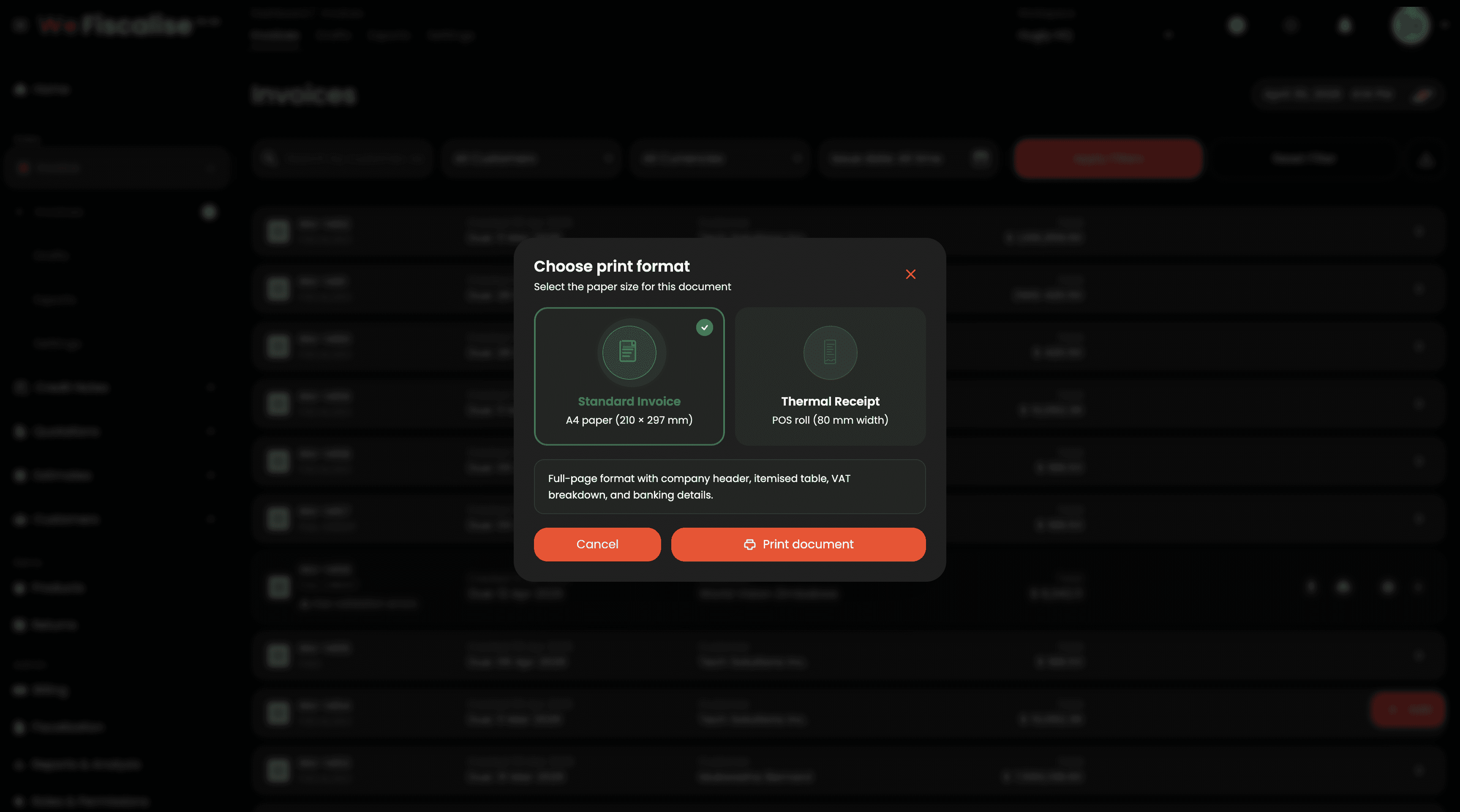
Print & Download Format Picker: All invoice and credit note detail and listing pages now show a format selection modal when you tap Print or Download PDF. Choose between:
Standard Invoice — A4 (210 × 297 mm), full-page layout with header, itemised table, VAT, and banking details
Thermal Receipt — 58 mm / 80 mm POS roll, compact layout optimised for thermal printers
POS Receipt View on Detail Pages: Invoice and credit note detail pages now include a POS View / A4 View toggle in the action bar. Switch instantly between a full A4 preview and a scaled thermal receipt preview — exactly as it will print on your POS device — without leaving the page.
Redesigned Reports & Analytics: The Report and Analysis page has been fully redesigned with a richer colour palette, gradient KPI cards, improved chart styling, and new detail panels including Invoice Health, Effective Revenue, Outstanding Breakdown, Overdue Aging, and Credit-Prone Customers. Data is easier to read and act on at a glance.
Mobile Bottom Navigation: On mobile devices, a floating bottom navigation bar now replaces the top-only menu. It groups pages into Home, Sales, Customers, Items, and Admin — with animated sub-item sheets that slide up when you tap a group. The active tab is highlighted with a pill indicator and an accent dot, making it much easier to move around the app with one hand.
#qr-code #print #pos #receipts #analytics #mobile #improvements
Complete Quotation and Estimate Management System

WeFiscalise now supports comprehensive Quotation and Estimate management, giving you full control over your pre-invoice documentation.
Create, edit, and manage professional quotations with teal-themed PDF output
Set validity periods with automatic expiry status tracking
Convert quotations to fiscal invoices with one click
Track status: ACTIVE, EXPIRED, CONVERTED, CANCELLED
Create, edit, and manage estimates with amber-themed PDF output
Professional disclaimer "NOT A BINDING AGREEMENT" on all estimates
Track estimate status: ACTIVE, CANCELLED
Customer selection with individual/company support
Multi-currency support (USD/ZWG)
Itemized line items with tax calculations and discounts
Terms & conditions library with reusable templates
Email delivery with PDF attachments
Share via link, WhatsApp, Messenger, Telegram, email
Clone existing documents for quick creation
PDF download and print functionality
Full permission-based access control (view, edit, delete, share)
#quotations#estimates#documents#new-feature
Quotation & Estimate Settings

Configure your quotation and estimate workflows with dedicated settings panels.
General: Default currency, tax rate, customer selection requirement, conversion to invoice toggle
Numbering: Custom prefix (e.g., QT), next number, reset options (never/yearly/monthly)
Terms & Conditions: Create, edit, delete reusable terms templates with default selection
Email Templates: Create and manage email templates for sending quotations
General: Default currency, tax rate, customer selection requirement
Numbering: Custom prefix (e.g., EST), next number, reset options
Terms & Conditions: Create and manage reusable terms templates
Email Templates: Create and manage email templates for sending estimates
All settings are workspace-specific and persist across your organisation.
#settings#configuration#quotations#estimates
Quotation to Invoice Fiscalization

Convert active quotations directly to fiscal invoices with ZIMRA compliance.
How it works: 1. Open a quotation in the details view 2. Click the "Fiscalize as Invoice" button 3. System automatically converts the quotation to an invoice 4. Invoice is fiscalized with ZIMRA FDMS in a single workflow
Quotation must be ACTIVE (not expired or already converted)
Fiscal day must be open (21:00–05:00 restriction applies)
Device must be properly configured
This streamlines your workflow by eliminating the need to recreate invoices from approved quotations.
#fiscalization#quotations#invoices#zimra
Quotation & Estimate PDF Templates

Professional, branded PDF documents for all your quotations and estimates.
Teal/cyan accent theme with validity badge
"QUOTATION" banner with expiry status (VALID/EXPIRED)
Banking details section
Powered by Hugly Studio footer
Amber/brown accent theme
"ESTIMATE" banner with "NOT A BINDING AGREEMENT" disclaimer
Clean footer with generation timestamp
Company logo integration
Customer details (individual or company)
Itemized table with HS Code, description, quantity, price, VAT, total
Discount row support with visual styling
Subtotal + VAT breakdown
Terms and conditions section
Automatic page numbering
Multi-currency formatting (USD/ZWG)
#templates#branding#quotations#estimates
Quotation & Estimate Share Links

Share quotations and estimates with customers via secure, expiring links.
Copy link to clipboard
Share via WhatsApp
Share via Messenger
Share via Telegram
Send via email
Download PDF directly from share modal
Links expire after 24 hours by default
View all active shares for any document
Deactivate links at any time
No authentication required for recipients
Perfect for sending documents to customers who don't have a WeFiscalise account or for quick mobile sharing.
#sharing#links#quotations#estimates
Quotation Email Templates & Delivery

Send professional quotation emails with customizable templates and PDF attachments.
Create reusable email templates
Dynamic placeholders:
{{customer_name}}, {{quotation_number}}, {{valid_until}}, {{company_name}}, {{total}}Set active/inactive status per template
Edit and delete existing templates
Send from quotation details page
Send from quotation preview page
PDF automatically attached
Delivery confirmation with success/error feedback
Templates can be managed in Quotation Settings → Email Templates.
#templates#quotations#delivery
Bulk invoice and credit note export to CSV

The new Export page lets you select any combination of invoices or credit notes and download them as a structured CSV file.
Filter by date range, currency, and status before selecting
Select individual records or use Select All for the current page
Paginated loading — handles thousands of records smoothly
CSV format compatible with Pastel, QuickBooks, Sage, and more
Navigate to Invoices → Exports or Credit Notes → Exports to try it.
#export#accounting
Walk-in customer quick-add modal on invoice creation

You can now add individual (walk-in) customers without leaving the invoice creation screen.
Click the Walk-in button next to the customer selector to open a compact modal. Enter the customer's first name, last name, phone number, and optionally email address and delivery address.
The new customer is immediately available in the invoice customer selector after creation — no page refresh required. This is especially useful for point-of-sale scenarios where you need to invoice a new individual customer quickly.
#customers#invoices#ux
ZIMRA FDMS fiscal day time restrictions

Opening a Fiscal Day is now restricted between 21:00 and 05:00 (local Zimbabwe time).
WeFiscalise will display a warning message and disable the Open Day button during restricted hours. The Close Day button remains available at any time.
Action required: Ensure you open the Fiscal Day before 21:00 to avoid any disruption to your end-of-day invoicing. If you attempt to open outside hours, you will see the message "Open unavailable (21:00–05:00)".
#zimra#fiscal-day#compliance